Find accounts that don’t follow you back
One read-only scan marks every account you follow as mutual or non-follower.
How it worksFind non-followers, track follower changes, filter inactive accounts and manage your X following list with powerful tools. No subscriptions, no premium plans, no artificial usage limits. Just free.
Dashboard above uses fictional sample accounts. UnfollowX Pro is an independent Chrome extension for x.com and twitter.com.
Not a free trial. Not a limited free plan. Not a product that asks you to upgrade later. UnfollowX Pro is free to use, with no subscription and no premium paywall.
No price today, no price later. Installing and using every feature costs nothing.
No caps set by UnfollowX Pro on scans, reviews or actions — and nothing reserved for “Pro” users.
Nothing to subscribe to, nothing to cancel. The extension never asks for payment details.
Whitelist, Keep rules, CSV, history, snapshots — every feature is available from the first minute.
“We believe useful tools should be accessible to everyone. That’s why UnfollowX Pro is free, and will remain free.”
 UnfollowX ProYour bill, today and every day
Unlimited product access ≠ unlimited platform actions. UnfollowX Pro sets no usage quotas, but X applies its own rate limits and rules to every account. Pacing controls help you stay measured; no tool can guarantee X will permit every action. How X limits work
Switch views, filter, search, protect and select. Everything below uses fictional sample accounts and runs in this page only. It never touches your X account.
Find who doesn’t follow back, see who left, spot quiet accounts and act with care. Each feature below is in the extension today — none of them cost anything.
One read-only scan marks every account you follow as mutual or non-follower.
How it worksEach followers check is compared with the last complete one: who left, who’s new.
How it worksFilter by 30, 90, 180 days or a year since an account last posted, replied or reposted.
How it worksAutomatically keep verified, private or big accounts, keyword matches and recent follows.
How it worksSafe, Balanced or Fast presets — or your own numbers.
How it worksScanning is read-only. Nothing changes on your account until you review the results and choose an action.
Add it from the Chrome Web Store. No account to create, no password to share.
Sign in to x.com as usual, click the extension and press “Scan my following”. It reads — it doesn’t change anything.
Protect who matters, select who goes, and start a paced run you can pause or stop — or simply close the tab.
You stay in control: whitelisted accounts are never unfollowed, runs can be paused or stopped anytime (Alt + Shift + S), and History lets you follow again.
Screenshots of the actual popup and dashboard, shown with fictional sample accounts.
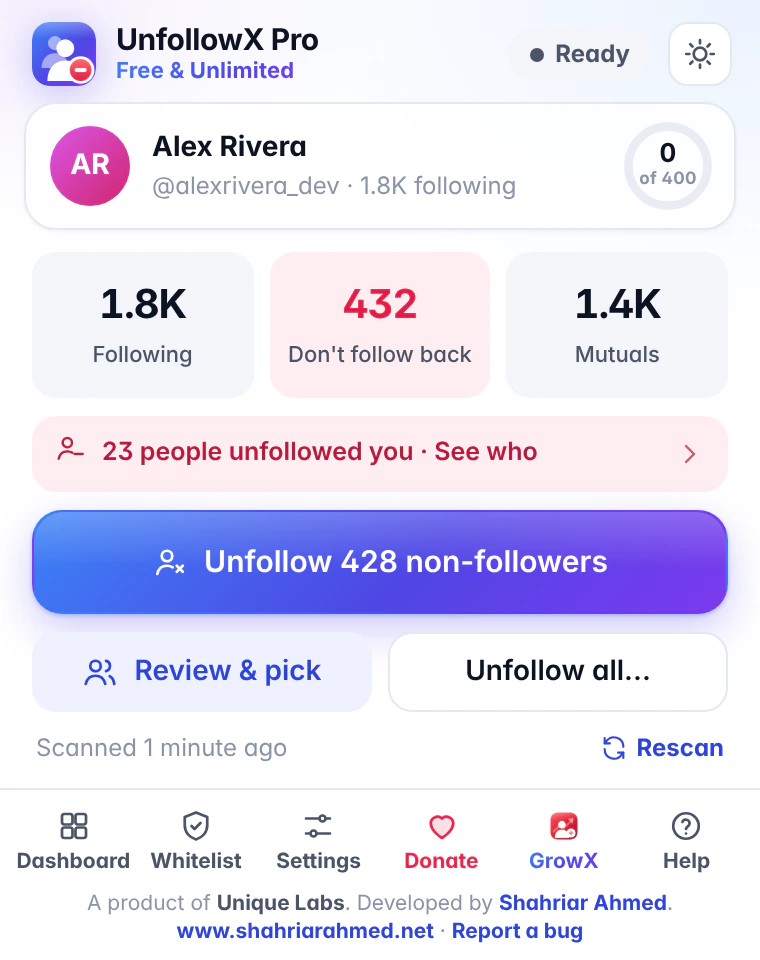
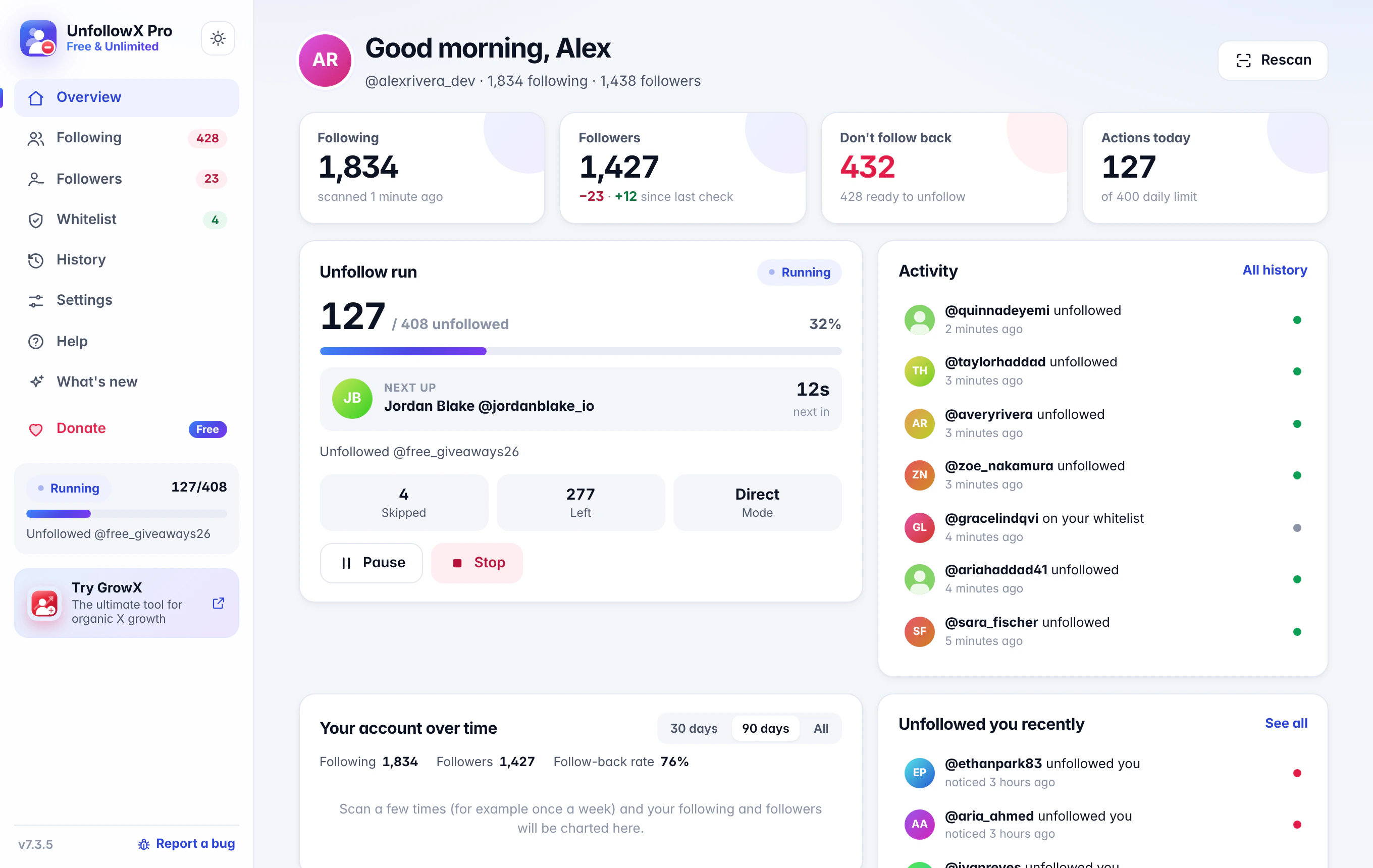
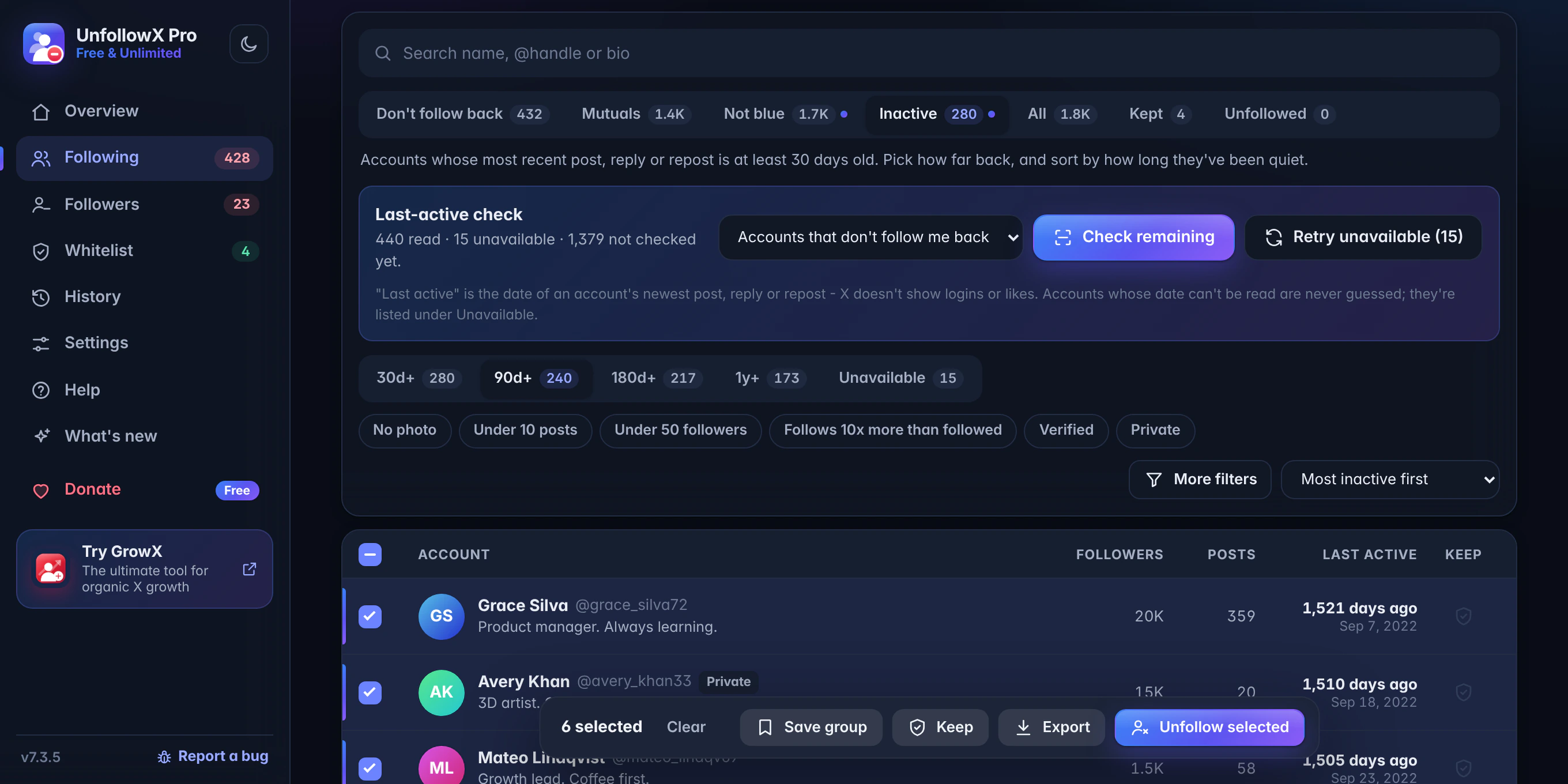
UnfollowX Pro works inside the X session you already use in Chrome. Here is exactly what that means — including the small amount of data that does leave your browser.
Read the full privacy policyRequests go to X itself (x.com, twitter.com and X’s app files on abs.twimg.com), the same way X’s website talks to X.
It doesn’t sign in for you and has no account system of its own.
Scans, follower snapshots, whitelist, settings and action history are saved on your device — not uploaded to the developer.
A random install ID, extension version, install / daily-active / uninstall events and a daily count of follow and unfollow actions. Country is derived on the server. Never your X account, lists or history. Off switch: Settings → Privacy.
Settings → Delete all extension data, or delete one X account’s data. Removing the extension clears it too.
Off by default. Chrome asks for permission only if you switch them on.
How a free-forever tool compares with the general model of subscription and freemium unfollow tools. Every tool differs — check any tool’s current pricing page before you decide.
| What you get | UnfollowX Pro | Subscription & freemium tools |
|---|---|---|
| Price | $0, forever | Monthly or yearly fee for full access |
| Subscription required | Never | Yes, for paid plans |
| Premium tier | None — one free product | Features split across plans |
| Usage caps set by the tool | None | Often tied to the plan |
| Non-follower detection | Included | Depends on the tool and plan |
| Smart filters (inactive, not blue, ratio…) | Included | Depends on the tool and plan |
| Whitelist & Keep rules | Included | Depends on the tool and plan |
| CSV export & import | Included | Depends on the tool and plan |
| Action history & follow again | Included | Depends on the tool and plan |
| Follower snapshots (who unfollowed you) | Included | Depends on the tool and plan |
| X’s own rate limits still apply | Yes | Yes — for every tool |
Read our guide to choosing a free X unfollow tool for a checklist you can apply to any option.
Three ways to find accounts that don’t follow you back on X — manually, with X’s own data, or with a free Chrome extension — plus what to do with the list.
Read articleX doesn’t notify you about unfollows. Here’s how snapshot comparison works, how to set it up, and why no tool can show unfollows from before you started.
Read articleA review-first way to bulk unfollow on X: pick the right group, protect important accounts, set a sensible pace and stay within X’s limits.
Read articleFind accounts you follow that have gone quiet on X, understand what “last active” can and can’t measure, and decide which quiet accounts to keep.
Read articleIncluding the fine print: what “free” and “unlimited” mean, and what X controls.
See all questionsYes. Every feature in UnfollowX Pro is free to use. There is no paid tier, no trial period, no credit card and no separate sign-up — you install it from the Chrome Web Store and start.
Yes. Being free is a core promise of the product, not a launch offer. There is no premium plan to upgrade to, and features are not moved behind a paywall.
No. UnfollowX Pro does not cap how many accounts you can scan, review or act on, and nothing is reserved for paying users.
You will see a daily limit in Settings: that is a pacing control you own (400 actions per rolling 24 hours by default, adjustable or switchable off). X also applies its own limits to every account, whatever tool you use — see Can X rate-limit actions?.
No. There is nothing to subscribe to and nothing to cancel. UnfollowX Pro never asks for payment details.
No. The extension works inside the X session you are already signed in to in Chrome. It never asks for, stores or sends your X password, and it never signs in for you.
Install UnfollowX Pro, open x.com in Chrome while signed in, click the extension icon and press “Scan my following”. The scan is read-only and usually takes about a minute. Your results show how many accounts don’t follow you back, and the dashboard lets you search, filter and review them.
Step-by-step: How to see who doesn’t follow you back on X.
After a scan, UnfollowX Pro reads your followers and saves a snapshot. On later checks it compares the new complete list with the previous one and shows who left, who is new and who you don’t follow back.
X does not provide an unfollow history, so no tool can show changes from before your first snapshot. More detail: How to find out who unfollowed you on X.
Yes. You can unfollow all non-followers in one click, select specific accounts in the dashboard, import a list of handles, or — if you really want a fresh start — unfollow everyone. Every run is paced with random delays, breaks and your daily limit, and whitelisted accounts are always skipped.
Yes. Accounts on your whitelist are never unfollowed, in any mode. Keep rules can also protect verified accounts, private accounts, accounts above a follower count, accounts matching keywords in their name or bio, and accounts you followed in the last N days. Both are checked before every unfollow, even mid-run.
Yes. UnfollowX Pro works on x.com and twitter.com, on both X’s new web layout and the classic one. Because X can change its website at any time, compatibility is maintained through extension updates.
No. UnfollowX Pro is a desktop Chrome extension (Chrome 116 or newer), and Chrome on phones and tablets does not run extensions. Use it on a Windows, macOS, Linux or ChromeOS computer; changes you make apply to your X account everywhere.
Yes. X sets its own limits for every account. Its help center describes a technical limit of 400 follows per day, additional ratio-based limits once you follow 5,000 accounts, and rules against aggressive or automated following behaviour. Limits can also be reduced temporarily.
UnfollowX Pro’s delays, breaks and daily limit help you work at a measured pace; if X asks it to slow down, the run rests, and if X asks you to verify your account, it stops and waits for you. No tool can guarantee X will allow every action, so start conservatively and stop if X shows a warning.
Your scans, follower snapshots, whitelist, Keep rules, groups, settings and action history are stored in Chrome extension storage on your computer. They are not uploaded to the developer. If you use several X accounts, each account’s data is kept separately.
UnfollowX Pro is built and supported by Shahriar Ahmed. For bug reports, include your extension version (bottom of the dashboard sidebar), your Chrome version and what happened — a screenshot helps.
Get powerful following-management tools without paying a subscription.
No sign-up · No X password · No premium plan